 Televisor LED COB todo en uno
 Pantallas LED flexibles
 Pantallas LED transparentes
 Cartel llevado
 Pantallas LED circulares
 Pantallas LED de columna
 Pantallas LED creativas y personalizadas
RESOLUCIONES 4:3 EN PÍXELES: TABLA COMPLETA + 16:9 VS 4:3
4:3 describes shape, not a fixed pixel count. Use the resolution chart first, then compare 16:9, camera formats and ways to fit content to a display.
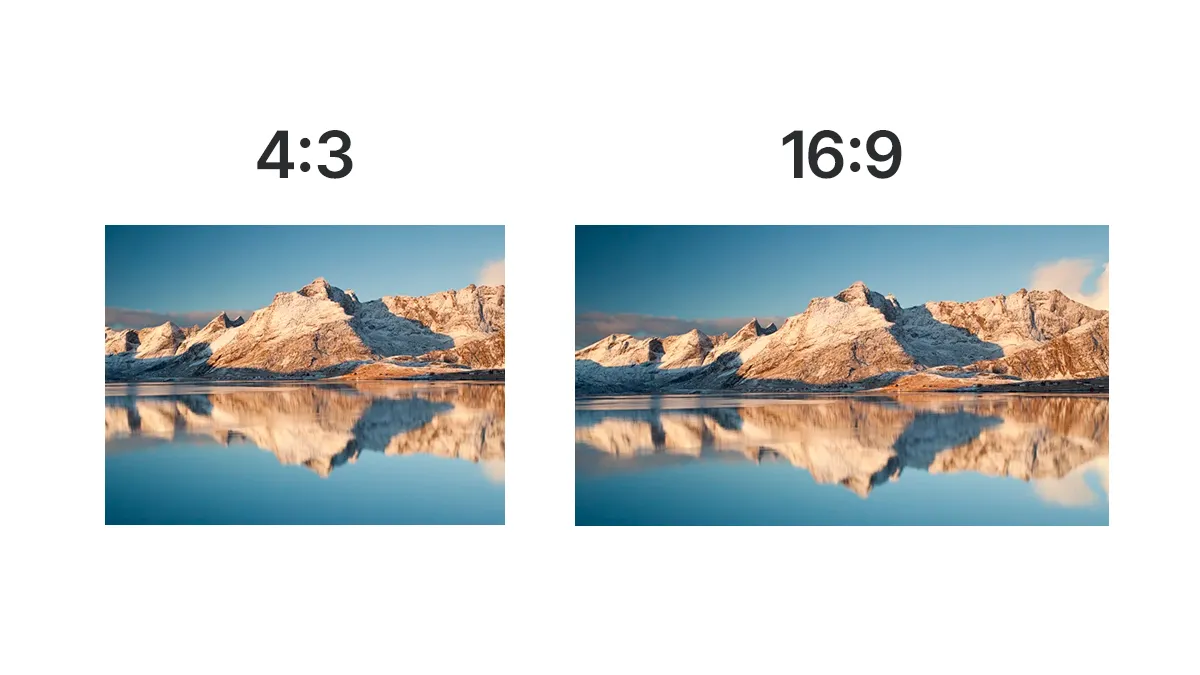
4:3 resolutions in pixels
For square pixels, a resolution is 4:3 when width divided by height equals 4/3. The table lists common examples, not the only possible sizes.
Desplácese horizontalmente para ver todas las columnas en una pantalla pequeña.
| Resolución en píxeles | píxeles totales | Common label or use |
|---|---|---|
| × 640 480 | 307,200 | VGA |
| × 800 600 | 480,000 | SVGA |
| × 1024 768 | 786,432 | XGA |
| × 1280 960 | 1,228,800 | 4:3 image or display mode |
| × 1400 1050 | 1,470,000 | SXGA + |
| × 1440 1080 | 1,555,200 | 4:3 with square pixels |
| × 1600 1200 | 1,920,000 | UXGA |
| × 1920 1440 | 2,764,800 | High-resolution 4:3 image |
| × 2048 1536 | 3,145,728 | QXGA |
1280 × 1024 is 5:4, while 1920 × 1080 is 16:9. Legacy anamorphic video can store a 1440 × 1080 frame and display it as 16:9 using non-square pixels; check the pixel-aspect metadata before deciding its displayed shape.
¿Alguna vez te has encontrado con una foto que se ve preciosa en tu teléfono, pero que aparece estirada en la pantalla de tu ordenador? Aquí es donde entra en juego la relación de aspecto. Para evitar que las fotos se vean estiradas, entrecortadas, distorsionadas, comprimidas o encogidas, necesitas ajustar la relación de aspecto.
En el pasado, solo había unas pocas opciones, pero hoy en día, con una amplia gama de pantallas, existen diferentes relaciones de aspecto, cada una adaptada a un tipo de pantalla diferente. Para tomar la mejor foto, deberá comprender qué es realmente.
Choose the ratio for the intended display and the composition you need. Pixel resolution, physical screen dimensions and aspect ratio are related, but they describe different things.
¿Qué es la relación de aspecto?
Aspect ratio is the relationship between width and height. To explain it further, it’s a proportional relationship between height and width of something. This does not determine the size of the object, but its ratio and shape. It’s written with a colon between two number, eg. a:b.
Aspect ratios usually describe images, video frames or display surfaces. The ratio stays the same when both dimensions scale proportionally. A photograph does not automatically change its aspect ratio when moved from a phone to a computer: software may fit, crop or stretch it to the available screen. The display shape and the image shape can therefore differ.
The first number represents width and the second represents height. A decimal ratio expresses the same width-to-height relationship: 16:9 is approximately 1.78:1, and 4:3 is approximately 1.33:1.
Tipos de relación de aspecto
Some of the subsets of aspect ratios are:
- Relación de aspecto de píxeles
Pixel aspect ratio is the relationship between the width and height of one pixel. Most modern computer images and direct-view LED canvases use square pixels, with a 1:1 pixel aspect ratio. Some legacy video formats use non-square pixels, so their stored frame dimensions alone do not describe the final displayed shape. A 4:3 display does not mean its individual pixels are 4:3.
- relación de aspecto de la pantalla
The proportional relationship between the width and height of the displayed image is its display aspect ratio. Match this shape to the intended screen. If the image and screen ratios differ, fitting preserves the image with borders, cropping fills the screen while losing edges, and stretching changes the shape of objects. Distortion is a consequence of stretching, not an unavoidable result of a ratio mismatch.
- relación de aspecto de almacenamiento
La relación de aspecto de almacenamiento (SAR) se refiere a la relación de aspecto de los archivos de vídeo digitales. Representa la proporción entre el ancho y la altura de cada fotograma. Cada fotograma debe mantener una relación constante. Para vídeos panorámicos, la fórmula suele ser SAR x PAR = DAR.
Cómo medir la relación de aspecto
Es importante que los fotógrafos y videógrafos calculen el tamaño. Dado que cada pantalla tiene una relación de aspecto determinada y las cámaras también tienen una relación de aspecto fija, a veces es necesario optimizar las imágenes para que se ajusten a la pantalla.
La relación de aspecto es independiente del tamaño de la imagen. Independientemente del tamaño de la imagen, se trata de una relación entre su altura y su anchura. Cuando se representa con dos puntos entre números, el primer número representa la anchura y el segundo la altura.
To calculate the aspect ratio, reduce width:height by their greatest common divisor. For 1600 × 1200 pixels, dividing both numbers by 400 gives 4:3. To resize without distortion, use new height = new width × original height ÷ original width. For example, a 1200-pixel-wide 4:3 image needs a height of 900 pixels. These calculations assume square pixels.
¿Por qué son importantes las relaciones de aspecto?
La relación de aspecto influye en cómo se toma la fotografía y en el aspecto final de la imagen. Dado que los distintos dispositivos pueden tener relaciones de aspecto diferentes, la imagen deberá ajustarse a ellas. Los fotógrafos y videógrafos deberán optimizar la relación de aspecto de la imagen para que coincida con la pantalla.
Planning the final ratio while capturing gives you more freedom later. If important subjects fill a 4:3 frame from top to bottom, cropping it to a wider ratio can remove part of the scene. Leave enough space around the subject when you need both photographic and widescreen versions. You can also fit the full image inside another canvas with borders instead of cropping.
Lo mismo ocurre con las relaciones de aspecto amplias. Si capturas la imagen con una relación de aspecto muy amplia, te resultará muy difícil recortarla sin recortar los bordes. Por eso es fundamental que entiendas la relación de aspecto antes de capturar las imágenes. La mejor opción sería elegir una relación que te ofrezca más posibilidades de optimización posteriormente.
¿Cuáles son algunas de las relaciones de aspecto más comunes?
Some of the most common aspect ratios are,
- 1:1
A 1:1 image has equal width and height. It is a square, commonly used for social posts, product images, printed photographs and square digital signs. It is useful when the composition needs similar space in both directions. On a wider television or video wall, the image can be fitted with side borders or placed within a wider content layout.
- 5:4
The 5:4 ratio is associated with large-format photography and landscape versions of 8 × 10 or 16 × 20 prints. In portrait orientation those become 4:5. Check the orientation and crop before printing; a camera image with another ratio may need some of its edges removed to fill the paper.
- 3:2
Many full-frame and APS-C digital cameras use 3:2, following the proportions of 35 mm still photography. A 6 × 4 inch print also has a 3:2 landscape ratio. Smartphones commonly use other native ratios, including 4:3, so verify the actual image dimensions instead of assuming all digital cameras use the same shape.
- 4:3
The 4:3 ratio appears in many compact cameras, smartphone photo modes and Micro Four Thirds cameras, as well as older televisions and projectors. It leaves more vertical room than a 16:9 crop at the same width. Sensor size alone does not determine the aspect ratio; check the camera’s native image format and any crop setting.
- 16:9
The 16:9 aspect ratio is common in television, online video, computer monitors and presentation screens. It can suit a landscape composition or a wide stage backdrop. Cinema also uses other, often wider, ratios; 16:9 is not a universal cinema format. When a camera offers a 16:9 photo mode, it may crop the sensor’s native image rather than capture extra horizontal detail.
Herramientas de relación de aspecto
Optimizing aspect ratios is highly crucial. Since each device has a different aspect ratio, photographers, videographers and software developers creating content for different devices need to optimize the ratio to match the device. For this reason, tools that can adjust the aspect ratio prove to be the creator’s best friend.
Post production software like Photoshop, Lightroom and Capture One can help you in adjusting the aspect ratio of your image. There are even some software online that can change the aspect ratio of your image with just a single click.
16:9 vs 4:3: ¿qué relación de aspecto es mejor?
16:9 y 4:3 son dos de las relaciones de aspecto más populares del mundo. Sin embargo, es importante saber cuál es la más adecuada para ti. Cada relación de aspecto se adapta mejor a distintos tipos de imagen. Por eso, es fundamental comprender los fundamentos de las relaciones de aspecto para elegir la más apropiada.
Para vídeos, la relación de aspecto 16:9 suele ser la más adecuada. Al producir un fotograma con un ancho un 78 % mayor que su altura, las imágenes resultantes son panorámicas. Por este motivo, esta relación de aspecto funciona mejor para vídeos donde se necesita capturar un área más amplia y mostrar más elementos en un solo fotograma. También es recomendable para imágenes que requieren un mayor ancho.
4:3 can work well for photography when it matches the camera’s native format or the intended composition. It does not inherently offer higher resolution than 16:9: resolution depends on the pixel dimensions. At a fixed capture width, cropping a 4:3 image to 16:9 removes vertical pixels. Choose the print ratio separately, since common paper sizes do not all match 4:3.
Desplácese horizontalmente para ver todas las columnas en una pantalla pequeña.
| Elemento | 4: 3 Aspect Ratio | 16: 9 Aspect Ratio |
|---|---|---|
| Ancho en relación con la altura | Width is about 1.33 × height | Width is about 1.78 × height |
| At equal height | Narrower canvas | About 33% wider than 4:3 |
| At equal width | More vertical canvas | 25% less height than 4:3 |
| Los usos más comunes | Photos, legacy AV, some dashboards | Television, online video, presentations |
| Resolución | Determined by pixel dimensions | Determined by pixel dimensions |
| Impresión | Match the paper ratio or plan a crop | Match the paper ratio or plan a crop |
| Replanteando | Leave room around the subject | Leave room above and below important content |
| Screen playback | Fit, crop or design a matching layout | Fit, crop or design a matching layout |
Conclusión
Understanding aspect ratio helps you avoid unwanted stretching and cropping. Start with the image or video you need to show, check its pixel dimensions, and decide how it should fit the final surface. Keep a full-resolution original so that different display and print versions can be prepared without repeatedly cropping the same file.
Applying aspect ratio to an LED wall
Start with the required content layout, then match it to the wall’s physical dimensions and native pixel canvas. For example, a hypothetical 4 m × 3 m image area is 4:3, while a 4 m × 2.25 m area is 16:9. These are planning dimensions, not a promise that every cabinet system can form those exact sizes.
For an existing 4:3 presentation on a wider wall, choose between side borders, a redesigned slide layout or a deliberate crop. Do not stretch circles, logos or faces to fill the canvas. Confirm the final pixel map with the content team before producing graphics.
Utilice el Calculadora con pantalla LED to explore size and resolution, then compare Opciones de videowall LED. Supply the available width and height, nearest viewing distance, source resolution and installation type for a practical layout review.
Pasaremos al siguiente paso a definir las dimensiones de la pantalla, las distancias de visualización, el contenido y las condiciones de instalación.
What resolutions have a 4:3 aspect ratio?
Is 1920 × 1080 a 4:3 resolution?
Is 4:3 better than 16:9 for photography?
How do I calculate an aspect ratio?
Can an LED wall display both 4:3 and 16:9 content?
What information is needed to plan an LED screen ratio?
Analice sus requisitos de brillo.
Cuéntenos qué funciones necesita la pantalla. Podemos sugerirle una configuración cuadrada y confirmar los detalles de brillo y potencia para su presupuesto.
Solicitar cotización