 Televisor LED COB todo en uno
 Pantallas LED flexibles
 Pantallas LED transparentes
 Cartel llevado
 Pantallas LED circulares
 Pantallas LED de columna
 Pantallas LED creativas y personalizadas
Stage LED pixel pitch and brightness for live events
Pick pitch from the audience and graphics. Pick brightness from the light falling on the screen. For an indoor conference, the smallest text on a real slide is a better starting point than the brightest setting in the catalogue.
What changes on a 6 × 3 m stage?
| Matrix 500 example | Píxeles por gabinete | Native wall canvas | Brillo estándar |
|---|---|---|---|
| Interior P2.6 | × 192 192 | × 2,304 1,152 | Liendres 1,000 |
| Interior P3.9 | × 128 128 | × 1,536 768 | Liendres 1,100 |
| Al aire libre P3.9 | × 128 128 | × 1,536 768 | Liendres 4,500 |
Each layout has twelve cabinets across and six high. P2.6 gives the presentation designer more room for fine characters. Choosing the outdoor P3.9 version changes the brightness and environmental specification while preserving the P3.9 pixel map.
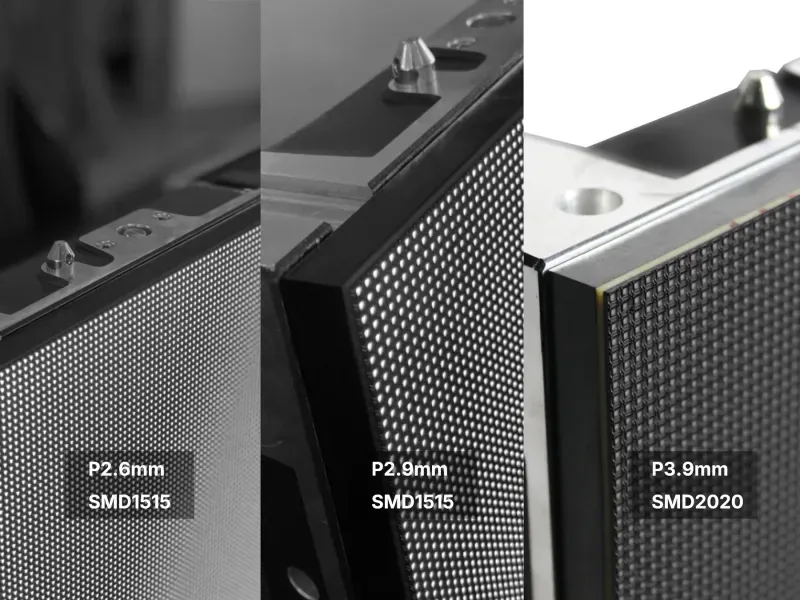
Read the smallest line from the front row
Ask the client for a slide with a timetable, a sponsor lockup or a line of legal text. Put it on the proposed canvas at the intended physical size. Check the front row, the furthest seat and the camera return before approving a pitch. A large logo and small type place different demands on the same wall.

Set brightness during rehearsal
Check the wall against the stage lighting while a face and a bright graphic share the camera frame. Then repeat with a dark gradient. Save the working display level with the camera exposure and processor configuration. For a daylight-to-evening show, record both operating conditions.
Test a conference slide and a camera shot separately
For a conference quotation, ask for the real agenda slide with its smallest speaker name. On a 6 × 3 m Matrix 500 indoor wall, P2.6 gives 2,304 × 1,152 pixels and P3.9 gives 1,536 × 768. Render the slide onto each proposed canvas with the same crop. Check it from the seats on the floor plan. Record which line can be read at the required position and keep that file with the quote.
For a live music show, use a shot list instead. Frame the presenter against a dark gradient, a sponsor graphic and fast-moving content. Run the intended camera settings with the actual stage lights. Save a short recording and note the settings where the screen detail and the performer both remain usable.
| Entrada de prueba | Mantén la constancia | Approve against |
|---|---|---|
| Conference slide | Layout, physical face and test seats | Legibility of the smallest required line |
| Fotografía | Lens, working distance, shutter and stage lighting | Recorded image at the operating brightness |
- Tema
- stage LED pixel pitch and brightness
- Selección
- Pick pitch from the audience and graphics. Pick brightness from the light falling on the screen. For an indoor conference, the smallest text on a real slide is a better starting point than the brightest setting in the catalogue.
- Configuration
- Each layout has twelve cabinets across and six high. P2.6 gives the presentation designer more room for fine characters. Choosing the outdoor P3.9 version changes the brightness and environmental specification while preserving the P3.9 pixel map.
Which slide should I use to decide whether indoor P3.9 is fine enough?
How many pixels do indoor P2.6 and P3.9 provide on the same 6 × 3 m Matrix wall?
Why should the camera operator attend the brightness rehearsal?
Should I order the finest pitch for an event showing mainly large sponsor logos?
Can the evening rehearsal tell me which brightness version to buy for a daytime show?
What evidence should go in the purchase file after the pitch test?
Analice sus requisitos de brillo.
Cuéntenos qué funciones necesita la pantalla. Podemos sugerirle una configuración cuadrada y confirmar los detalles de brillo y potencia para su presupuesto.
Solicitar cotización