 Televisor LED COB todo en uno
 Pantallas LED flexibles
 Pantallas LED transparentes
 Cartel llevado
 Pantallas LED circulares
 Pantallas LED de columna
 Pantallas LED creativas y personalizadas
What Is Grayscale? Brightness vs Grayscale Explained
Grayscale describes intensity steps; brightness describes light output. Both matter when an LED display must reproduce detail at the right level for its surroundings.
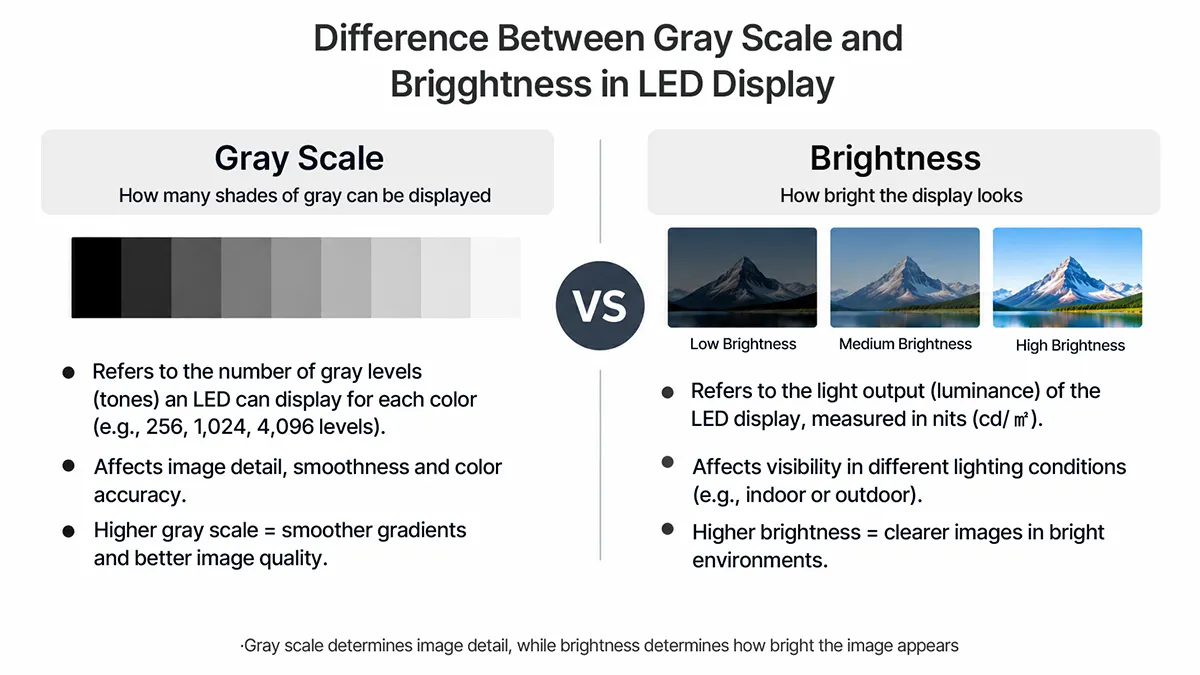
Desde gigantescas pantallas LED publicitarias para exteriores hasta pantallas de pared para interiores, las pantallas LED están por todas partes. Si estás buscando pantallas LED, probablemente hayas oído hablar de los conceptos de escala de grises y brillo, pero ¿en qué se relacionan y en qué se diferencian?
¿Qué es la escala de grises en las pantallas LED?
The Grayscale of an LED displays is the range of brightness levels between the darkest black and the brightest white that can be displayed. Essentially, it is the spectrum of gray levels that an LED pixel can produce. Each pixel in an LED display can be altered in intensity to produce different shades of gray, which enhances the depth and detail of the overall image. The number of gray levels an LED display can produce directly affects its ability to display detailed, lifelike images.
Higher gray levels allow for finer transitions between tones, which improves image quality through more detailed textures and smoother gradations.
¿Qué es el brillo de la pantalla LED?
The brightness of an LED screen is measured in nits or candelas per square meter (cd/m²) and refers to the intensity of light emitted by the screen. It measures the amount of light produced by the screen and affects how content is viewed in various lighting conditions. Brightness is a key attribute of LED displays, especially for outdoor LED displays in direct sunlight.
Conversely, indoor screens may require lower brightness, but still need to be adjusted for ambient light conditions to ensure comfort and prevent eye strain.
La diferencia entre la escala de grises y el brillo en las pantallas LED
Grayscale and brightness are intertwined in defining the visual quality of an LED display. Grayscale depth requires precise control of the brightness level of each pixel to render the various shades between black and white. They are a balancing link. Increasing the brightness of an LED screen without properly adjusting the grayscale can result in a faded image that loses exquisite detail.
Conversely, a monitor with excellent grayscale but insufficient brightness may not achieve the desired effect, especially in bright environments.
Optimizing both attributes for the intended use improves the result. For a DOIT VISION project, first define the lighting conditions and content, then evaluate brightness and tonal detail together on the proposed LED configuration. A high headline brightness or bit-depth number on its own does not establish picture quality.
Para aclarar la diferencia entre escala de grises y brillo en las pantallas LED, puede consultar lo siguiente:
Scroll horizontally to see all columns on a small screen.
| Aspecto | Escala de grises | Brillo |
|---|---|---|
| Definición | The available intensity steps between black and white, applied to the RGB channels in a color LED display. | The screen’s emitted luminance, normally specified in nits. |
| Propósito principal | Se utiliza para transmitir imágenes, determinando la nitidez y el detalle de la imagen al permitir la representación de diferentes tonalidades de gris. | Controla la visibilidad general de la pantalla, lo que afecta a la facilidad con la que se puede ver el contenido en diferentes condiciones de iluminación. |
| Información transmitida | How finely changing intensity can represent gradients, shadows and texture. | How much light the screen emits at a specified operating setting. |
| Impacto en la calidad de la imagen | Afecta al detalle y la textura de la imagen, permitiendo un contenido visual matizado con profundidad y realismo a través de la representación de múltiples tonalidades. | Influye en la visibilidad y la interacción con la pantalla, especialmente en entornos con condiciones de iluminación variables, y afecta a la viveza general de la imagen. |
| Relationship with color | Intensity steps in each RGB channel contribute to both neutral gray and color reproduction. | Brightness, white balance and calibration jointly affect perceived color. |
Cómo ajustar la escala de grises de una pantalla LED.
Ajustar la escala de grises de una pantalla LED implica calibrarla para asegurar que reproduzca con precisión todo el espectro de tonos de gris entre el blanco y el negro. Existen dos métodos principales para controlar la escala de grises de los LED: ajustar la corriente y usar la modulación por ancho de pulso (PWM).
Ajustar la corriente que fluye a través del LED
The first method involves varying LED drive current within the limits of the selected driver and LED package. There is no universal 20 mA operating value for every display. Current, temperature and calibration can affect light output and color, so a buyer should evaluate the specified operating mode rather than manually alter module current settings.
Modulación de ancho de pulso (PWM)
The second method is Pulse Width Modulation, which utilizes the visual ephemeral properties of the human eye. By rapidly turning LEDs on and off in very short periods of time (adjusting the duration (or width) of the “on” pulse relative to the “off” period (duty cycle)), PWM can simulate a variety of brightness levels.
At sufficiently high switching rates, viewers perceive an integrated light level rather than separate pulses. Cameras may still reveal artifacts depending on exposure, scanning and timing. PWM is widely used in LED drivers, but usable low-gray performance must be checked at the intended brightness and refresh configuration.
Sistemas de control de pantallas LED
Las pantallas LED modernas suelen utilizar modulación por ancho de pulsos (PWM) para el control de la escala de grises y la integran en su sistema de control, que consta de la caja de control principal, la placa de escaneo y el panel de visualización. La caja de control recibe los datos de brillo de los píxeles de la tarjeta gráfica del ordenador y los redistribuye a varias placas de escaneo. Cada placa de escaneo gestiona un número específico de filas (o columnas) en la pantalla LED, transmitiendo señales de control a los LED individuales en modo serie.
Transmisión en serie de señales de control de pantalla
Two useful architectural concepts are centralized timing and distributed driver control. A controller can prepare the timing or intensity information centrally, while driver ICs at the modules apply the current and switching pattern to the LEDs. The exact division of work varies with the receiving cards and drivers.
In a distributed PWM implementation, intensity values are loaded into driver registers and the driver generates the output pulses. This can reduce the need to transmit every switching transition from the upstream controller. Modern driver ICs may provide much more than 8-bit grayscale processing; the Texas Instruments TLC5958 documentation, for example, describes 16-bit PWM control. This example explains driver operation and is not a component claim for a particular DOIT VISION series.
The practical purchasing question is how the complete system behaves. Ask which input bit depth is accepted, which internal processing mode is used and whether reducing screen brightness preserves smooth dark gradients. A specification for one chip is not proof of the output of the complete wall.
En la práctica, para ajustar la escala de grises de una pantalla LED, es posible que necesite software y equipos especializados. A continuación se detallan los pasos abreviados:
Calibration equipment and software: Use suitable measurement equipment and the calibration workflow supported by the selected control system. Record the target brightness, white point and signal range before making adjustments, and keep the original configuration available for comparison.
Setting the black level: First adjust the black level of the display to ensure that the darkest blacks are as deep as possible without losing detail in dark scenes.
Gamma Correction: Set the appropriate transfer response so the incoming signal is reproduced with the intended relationship between code values and luminance. Gamma is not a promise that physical luminance becomes linear to human perception; use test patterns and measurements to verify the chosen response.
Final Test and Adjustment: After the initial adjustments, the monitor is tested with a series of images to ensure that the grayscale rendering is fully accurate.
¿Qué ocurre con una pantalla LED si la escala de grises no está configurada correctamente?
Si la configuración de la escala de grises en una pantalla LED es incorrecta, puede provocar diversos efectos perjudiciales que afecten al rendimiento de la pantalla y a la experiencia del usuario. A continuación, se enumeran algunos ejemplos de posibles errores:
Pérdida de detalle de la imagen y distorsión del color
Problem: Inadequate grayscale settings can reduce the number of brightness levels that can be displayed by the display, resulting in a loss of image detail.
Example effect: Subtle gradations of sky or texture in a natural scene become blurred and may not accurately reproduce colors, resulting in unnatural or skewed tones, especially noticeable in detailed or textured images such as human faces.
Contraste y nitidez de imagen reducidos.
Problema: Una escala de grises incorrecta afecta la capacidad del monitor para distinguir entre los elementos más claros y los más oscuros, lo que repercute en el contraste general y la nitidez de la imagen.
Example effect: Images may appear too bright or too dark, which impairs the depth and richness of visual content. Details may be blurred, making it difficult to distinguish between different elements in the image.
Desperdicio de energía y vida útil reducida
Problem: Running a screen brighter than the venue requires can increase power consumption and thermal load. Higher grayscale bit depth alone does not necessarily increase brightness or shorten display life.
Example effect: Unnecessarily high brightness can raise operating costs and thermal load. Evaluate these effects through the actual operating configuration; a grayscale setting alone does not establish a particular lifetime or failure rate.
Disminución de la experiencia del público
Problema: El efecto acumulativo de estos problemas reduce significativamente el disfrute del espectador.
Example effect: A combination of blurry images, distorted colors, and insufficient contrast can lead to viewer fatigue, making prolonged viewing of a display uncomfortable or less engaging.
Para resumir
Both the grayscale and the brightness of an LED display are important for achieving optimal image quality. Good brightness ensures that the LED display can be easily seen in a variety of lighting conditions, while depth of gray adds nuance and detail to the image, making the content lifelike, realistic and vibrant. Whether it’s outdoor advertising, indoor LED screens for entertainment, DOIT VISION will do its best as possible, so feel free to contact us if you need a high quality LED display.
Grayscale in indoor and outdoor LED displays
Las diferencias entre los requisitos de escala de grises de las pantallas LED para interiores y exteriores son las siguientes:
Scroll horizontally to see all columns on a small screen.
| Elemento | Pantallas LED de interior | Pantallas de LED al aire libre |
|---|---|---|
| Grayscale requirements | Evaluate gradients at the intended indoor brightness | Evaluate gradients at both daytime and dimmed nighttime settings |
| Iluminación ambiental | Iluminación interior relativamente estable | Varía significativamente con la luz solar directa y las sombras. |
| Proximidad al público | Las distancias de visualización más cercanas requieren mayor detalle y cambios de color. | Generalmente se observa desde mayores distancias; el enfoque está en el brillo y el contraste. |
| Calidad de Imagen | Requiere efectos de imagen delicados y realistas con colores más intensos y detalles más nítidos. | Prioriza la visibilidad clara bajo diversas condiciones de iluminación, haciendo hincapié en el brillo y el contraste por encima del detalle. |
| Rendimiento en escala de grises | Diseñado para mostrar más niveles de brillo para una experiencia visual más matizada. | Garantiza una escala de grises adecuada para mantener el contraste de color y el detalle en condiciones de luz intensa. |
| Optimización del sistema de control | Imprescindible para mejorar la reproducción de escala de grises y color. | Fundamental para equilibrar el brillo, el contraste y la escala de grises para optimizar la visibilidad en exteriores. |
Checking grayscale at your project brightness
Before accepting an LED wall, test neutral ramps, dark gradients, skin tones and your own graphics at the actual operating brightness. Repeat the test after dimming; a wall that looks smooth at maximum output may behave differently in a dim meeting room. Keep source format and processor settings consistent when comparing samples.
Record the brightness setting, control-system configuration and ambient light alongside the observations. This makes an issue reproducible and helps distinguish source banding from a display or calibration problem.
For close-view indoor work, review pantallas LED de paso fino. Include the viewing distance, room lighting, screen dimensions and representative content when discussing a configuration. For bit-depth terminology, continue with Pantalla LED en escala de grises.
Bring the screen dimensions, viewing distances, content and installation conditions to the next step.
What is the difference between grayscale and brightness?
Does higher brightness mean better grayscale?
How does PWM control LED grayscale?
Why does an LED wall lose detail when dimmed?
Are indoor and outdoor grayscale requirements different?
How should I compare grayscale on proposed LED displays?
Analice sus requisitos de brillo.
Cuéntenos qué funciones necesita la pantalla. Podemos sugerirle una configuración cuadrada y confirmar los detalles de brillo y potencia para su presupuesto.
Solicitar cotización