 Televisor LED COB todo en uno
 Pantallas LED flexibles
 Pantallas LED transparentes
 Cartel llevado
 Pantallas LED circulares
 Pantallas LED de columna
 Pantallas LED creativas y personalizadas
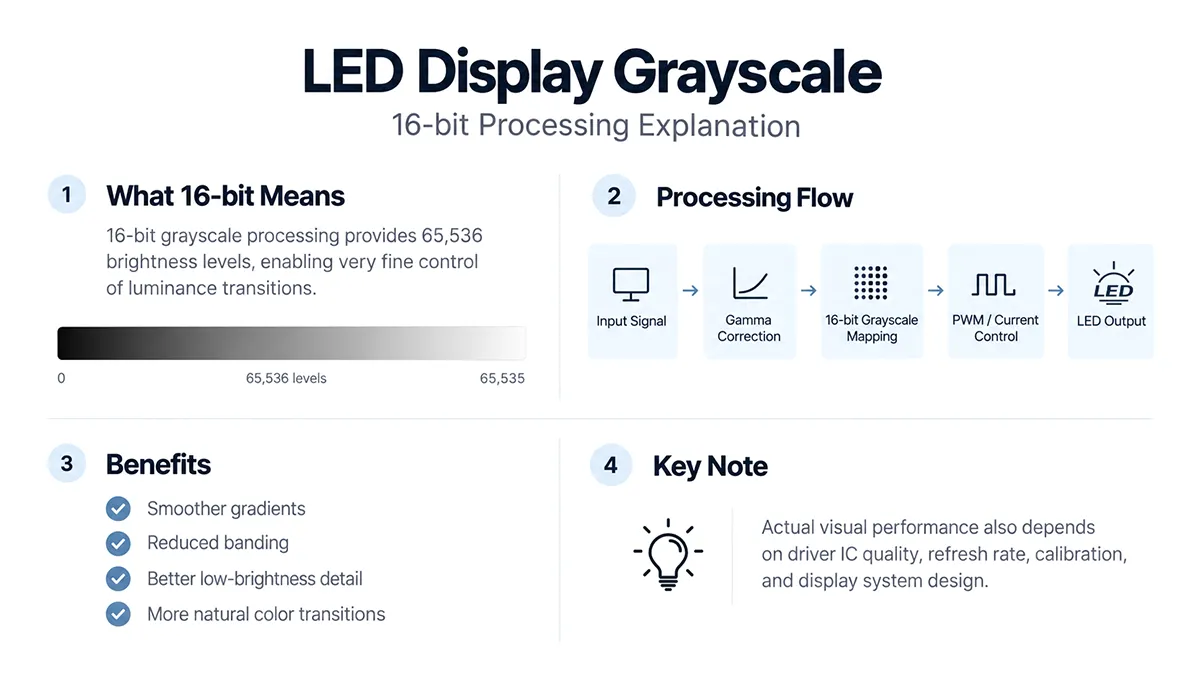
LED DISPLAY GRAYSCALE: 16-BIT PROCESSING EXPLAINED
A 16-bit processing stage has 65,536 possible code values per channel. That figure describes precision at one stage, not a guarantee of visible picture quality.
Do you have a flexible LED display screen or are you planning to invest in one for indoor/outdoor usage? If so, you must be interested in learning everything about LED display screens and how they work, right? Now, most of the information on these screens are commonly known and familiar by everyone. However, when it comes to understanding the advanced ideas of LED display screens, there’s a lot that might not be familiar to everyone.
From the nits to the size of the LED display and much more, not everyone commonly knows a lot of the LED display information. Talking about this, one such thing here that causes great confusion is the grayscale that is present in the parameter information of the LED display screen. Most people consider this to be a part of the screens LED setup. However, there’s a lot more to it.
Grayscale describes intensity steps from black to white; in a color LED display those steps also apply to each RGB channel. The important distinction is between source-video bit depth and the processing or PWM precision inside the LED system.
¿Qué es la escala de grises?
In color science, a grayscale image consists of neutral tones between black and white. On a display, the appearance of those tones depends on emitted light, ambient reflections, black level and calibration. An equal RGB code value represents a neutral tone only when the signal and display are interpreted consistently.
An 8-bit intensity channel has 256 possible code values, from 0 through 255. For 8-bit RGB, three channels give 256 × 256 × 256 = 16,777,216 possible code combinations, often called 24-bit color. That is different from 24-bit grayscale. Video range, processing and calibration affect which values are used and what the display actually reproduces.
Esto abarca los conceptos básicos de la escala de grises en términos de percepción del color. Sin embargo, al hablar de la escala de grises en pantallas LED, nos referimos principalmente a su uso en la representación gráfica. Para una mejor comprensión, profundicemos en este tema.
Escala de grises de la pantalla LED
A higher processing bit depth can provide finer intensity increments, which may help smooth gradients and preserve detail after brightness adjustment or calibration. For example, 16-bit processing has more possible internal levels than 14-bit processing. It does not automatically make the source more detailed or guarantee that every additional level is visibly distinct.
However, this doesn’t mean that only the presence of a higher grayscale can increase the quality of your LED displays content. This is mainly because the grayscale level also depends on the overall digital-to-analog conversion system of the LED display. This includes the compatibility of the system’s video processing chip, the memory, and the transmission system.
If all these parts of an LED system support the higher bits of grayscale, then the larger grayscale level can work in enhancing the overall content quality of your LED display. Altogether, we can say that all of the components go hand in hand in terms of increasing the richness of the screen.
Niveles de escala de grises
Now that we’ve discussed how the system of a LED display needs to be compatible with the higher levels of grayscale, it’s highly important to understand what levels are supported with that kind of display screens. So let’s discuss the two different types of LED display grayscale below.
- Simple signs and large graphics may not reveal small tonal differences as readily as photographs. Even so, check that logos, background gradients and dimmed night operation remain smooth; there is no universal rule that 13-bit processing is sufficient for every indoor or outdoor display.
- Film, photography, faces and fine gradients make low-gray behavior more visible. Higher internal processing precision can help, but request a demonstration with the actual source format and brightness setting instead of specifying a universal 14-bit minimum.
Desplácese horizontalmente para ver todas las columnas en una pantalla pequeña.
| Profundidad de bits | Possible code values per channel | Significado |
|---|---|---|
| 8 bits | 256 | Common source-video depth |
| 10 bits | 1,024 | Used by HDR10 source video |
| 14 bits | 16,384 | Possible internal processing precision |
| 16 bits | 65,536 | Possible driver/PWM processing precision |
These are mathematical code counts, not a promise of equally many distinguishable shades on a finished display. Input bit depth, driver precision, scanning and brightness control refer to different stages.
¿Cuanto mayor sea la escala de grises de la pantalla LED, mejor?
Grayscale precision is useful, but a larger number is not always a visibly better result. Source quality, processing, calibration and operating brightness determine the practical benefit. Compare smooth gradients and shadow detail on the proposed configuration, then weigh that result against the complete system cost rather than choosing by the largest bit-depth figure alone.
An 8-bit SDR source and a 10-bit HDR source describe video inputs, while 14-bit or 16-bit figures in LED specifications often describe internal processing. They should not be compared as if they were the same specification. Verify supported formats throughout the player, processor, receiving cards and modules.
Conclusión
So this is all to the detailed understanding of LED display grayscale and how it works in improving the different types of LED display screens content quality. Hence, if you consider this grayscale level understanding and it’s working criteria, you’ll surely be able to get a better-LED display that fits your content quantity and quality needs.
A practical grayscale check for an LED buyer
Ask whether the quoted bit depth describes the source input, processing pipeline or driver output. Then request a demonstration with your own material and the intended brightness setting. Test smooth gray ramps, near-black steps and low-saturation gradients; observe whether dimming introduces banding or a color cast.
For a room where people read small text and watch video at close range, compare pantallas LED de paso fino using both pixel layout and low-gray behavior. A headline bit depth is only one part of that choice.
Provide the screen dimensions, closest viewing distance, source format and lighting conditions with a project inquiry. If you are still separating light output from tonal precision, read the grayscale and brightness comparison.
Pasaremos al siguiente paso a definir las dimensiones de la pantalla, las distancias de visualización, el contenido y las condiciones de instalación.
What does 16-bit LED grayscale mean?
How many gray levels does an 8-bit signal contain?
Is 16-bit grayscale always better than 14-bit?
Can 16-bit processing improve an 8-bit video source?
Is grayscale bit depth the same as HDR support?
What should buyers check beyond the grayscale number?
Analice sus requisitos de brillo.
Cuéntenos qué funciones necesita la pantalla. Podemos sugerirle una configuración cuadrada y confirmar los detalles de brillo y potencia para su presupuesto.
Solicitar cotización